What A7 means (fisher paykel a7 error)
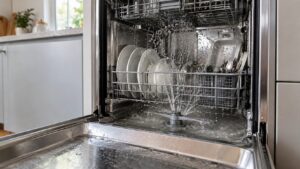
A fisher paykel a7 error on a DishDrawer is an excess-foam auto-recovery code — too much foam was detected in the drawer, so the DishDrawer runs an auto-recovery program to clear it and complete the cycle. Fisher & Paykel DishDrawer dishwashers use a SmartDrive direct-drive motor as both the wash and drain pump, and the error-code scheme varies by generation, so always match the code to your DishDrawer model. It is usually caused by the wrong detergent or too much of it, and is a low-severity, owner-fixable condition rather than a hardware problem.
Symptoms to look for
Because A7 is a recovery routine rather than a hard problem, the drawer usually keeps working while it deals with the foam — it just takes longer and may look frothy through the cycle. The clues center on excess suds and an extended run time, and they almost always follow a load where the detergent was wrong or over-measured. Match what your DishDrawer is showing to the signs below to confirm foam is the trigger.
- “A7” shows and the drawer runs longer to recover
- Excess foam is visible in the drawer
- It may follow a heavy or wrong detergent dose
- The cycle still completes after recovery
Likely causes of a fisher paykel a7 error
Foam in a DishDrawer comes almost entirely from what goes into it. Hand-wash liquid or general-purpose soap foams far more than dishwasher detergent, an over-dose of the right product does the same, and an excess of rinse aid or heavy grease residue can tip an otherwise normal load over the edge. The causes below run from the most common to the least.
- Wrong detergent — hand-wash or non-dishwasher soap foams heavily
- Too much detergent — an over-dose creates excess foam
- Rinse-aid overdose — contributes to foaming
- Food residue oils — heavy grease can add to foam
What you can check
Resolving A7 is mostly about correcting the detergent and letting the DishDrawer finish what it has started. The steps below adjust the input first, then give the SmartDrive recovery program room to clear the foam on its own. None of this calls for opening the drawer mechanism or touching wiring — if A7 returns with the right product, that is the moment for a qualified technician.
- Use only dishwasher-specific detergent in the recommended amount.
- Let the auto-recovery program finish — the cycle is designed to clear the foam.
- Avoid pre-rinsing with foaming hand soap.
- If A7 recurs with correct detergent, book service to check the wash system.
Parts a technician may check or replace
If A7 keeps appearing despite the correct dishwasher detergent, a technician looks past the product to the detergent dosing, the SmartDrive wash pump, and the rinse system that together control foaming. The correct part for your Fisher & Paykel DishDrawer is matched from the model and serial number, and genuine components are fitted through trusted parts suppliers rather than generic substitutes so the wash cycle stays clean and the appliance keeps its long working life. Confirming the failed part before ordering avoids replacing more than the problem actually requires.
When to call a technician
A7 that recurs with the correct dishwasher detergent needs a technician to check the wash pump and rinse system. When the fix calls for experienced service, book a visit through our scheduling page and a specialist technician will diagnose and repair it, backed by our 30-day labor warranty.
Prevention and care
Keeping A7 from returning is largely about feeding the DishDrawer the right products in the right amounts. Use only dishwasher detergent, measure it to the dose marked for your water hardness, and keep the rinse-aid setting moderate so it does not add to the foam. Scraping heavy grease before loading helps too, and clean the filter regularly so residue does not build up. If A7 still appears with everything dosed correctly, note the detergent in use before resetting the drawer so a technician can check the wash system efficiently.
Related help and Fisher & Paykel resources
Browse other Fisher & Paykel Dishwasher diagnostics, read about Fisher & Paykel Dishwasher repair, look up your unit in the Fisher & Paykel models reference, or the related excess foam symptom, browse service locations, or schedule a service visit. For Fisher & Paykel manufacturer documentation and model lookup, visit Fisher & Paykel at fisherpaykel.com/us.